Server-side Tracking
Server-side tracking works by matching affiliate referral activity on the front end of your website to the transactional data your backend sends to Refersion later. The diagram below shows how the two halves connect for link-based affiliate referrals.
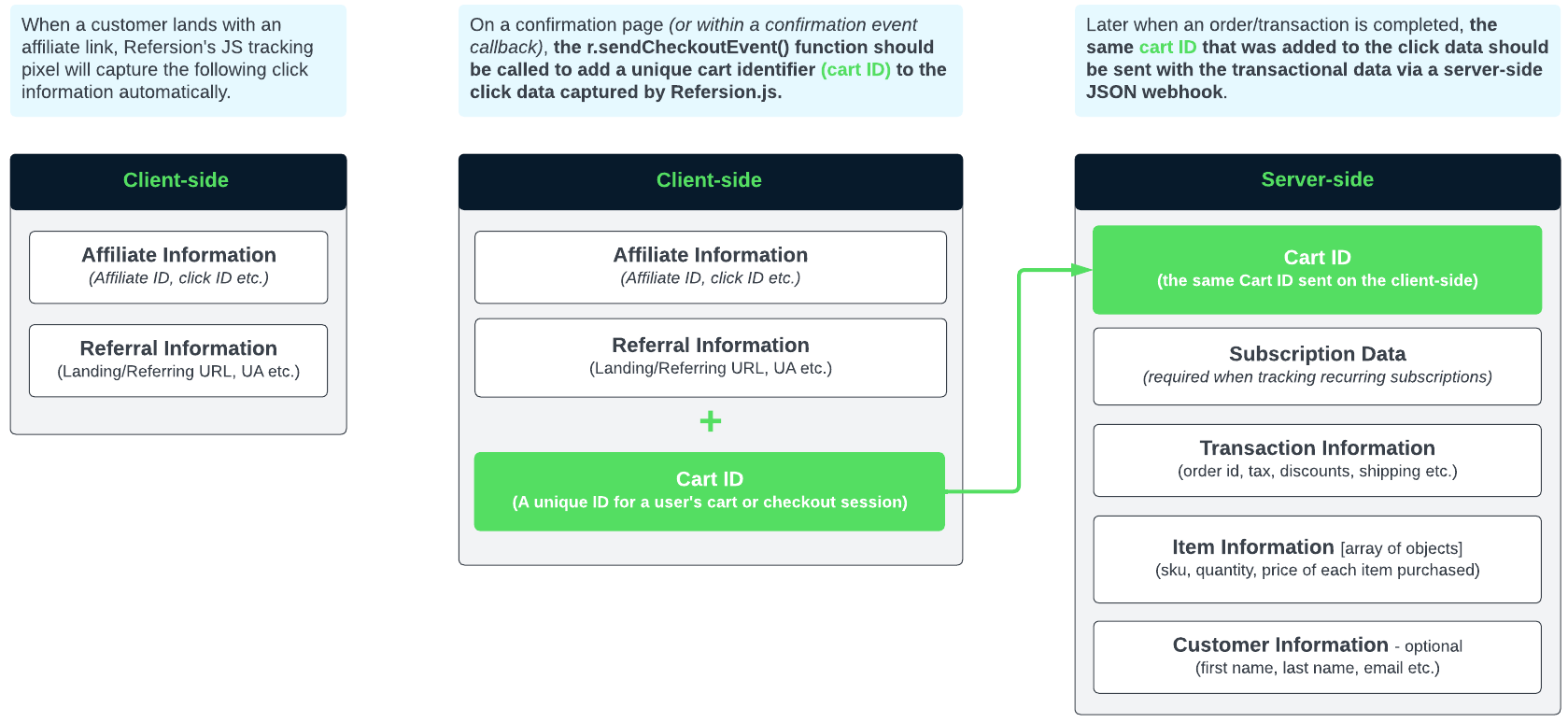
This guide has three steps: two client-side, one server-side.
Step 1 (client-side) — Track visits
This snippet captures the click when an affiliate refers a shopper to your website. Copy it into the
<head> section of every page where you expect affiliates to drive traffic, replacing
YOUR-PUBLIC-KEY with the Public API key from your Refersion account.
<!-- REFERSION TRACKING: BEGIN -->
<script>
! function(e, n, t, i, o, c, s, a) {
    e.TrackingSystemObject = "r", (s = n.createElement(t)).async = 1, s.src = "https://cdn.refersion.com/refersion.js", s.onload = function() {

        // Replace with your Refersion Public API Key
        r.pubKey = "YOUR-PUBLIC-KEY";

        // Uncomment next line if you need to debug during testing
        // r.settings.dbg_mode = true;

        r.initializeXDLS().then(() => {
            r.launchDefault().then(() => {

                // Send a custom event that can be listened to later
                const rfsnTrackingEvent = new Event("refersion-loaded");
                document.dispatchEvent(rfsnTrackingEvent);

            })
        })
    }, (a = n.getElementsByTagName(t)[0]).parentNode.insertBefore(s, a)
}(window, document, "script");
</script>
<!-- REFERSION TRACKING: END -->
Step 2 (client-side) — Identify visits
Once clicks are tracked on your site, Refersion needs a way to associate the click that happened in the browser with the order data you will send from your server later.
Webhooks are reported server-side, so Refersion cannot read the shopper's browser session at that
point. Instead you send a cart_id: a value that appears both in the click data and in the webhook,
linking the two together.
The cart_id may be any string value up to 255 characters.
cart_idMake sure cart_id is not sequential or easily guessed — use something like a session ID or an
encrypted combination of several strings.
Some platforms already provide an identifier you can reuse. If yours isn't listed, look for an equivalent identifier or generate your own.
| Platform | Sample identifier | Availability | Reference |
|---|---|---|---|
| Shopify | Cart Token | All storefront pages | Get Cart (Ajax API) |
| Shopify | Checkout Token | After creating a checkout | Checkout Storefront API |
| BigCommerce | Cart ID / Checkout ID | All pages (after a cart is created) | Get cart |
| WooCommerce | Order Key | Order confirmation page | Order information breakdown |
| Stripe | Customer ID | After creating a customer | Create a customer (REST API) |
| Stripe | Subscription ID | After creating a subscription | Create a subscription (REST API) |
| Chargebee | Subscription ID | After creating a subscription | Subscription attributes (REST API) |
Code snippet for identifying visits
Use the snippet below to report your cart_id to Refersion during the shopper's browsing session.
Add it near the bottom of your "Thank You" or order confirmation page, usually just before the
closing </body> tag. If your site has no confirmation page, call sendRefersionCheckoutEvent()
directly from your code once the order completes.
Replace YOUR-CART-ID with the actual cart_id value from your site.
<!-- REFERSION TRACKING: BEGIN -->
<script>
function sendRefersionCheckoutEvent(cartID) {
    const rfsn = {
        cart: cartID,
        id: localStorage.getItem("rfsn_v4_id"),
        url: window.location.href,
        aid: localStorage.getItem("rfsn_v4_aid"),
        cs: localStorage.getItem("rfsn_v4_cs")
    };
    r.sendCheckoutEvent(rfsn.cart, rfsn.id, rfsn.url, rfsn.aid, rfsn.cs);
}

// Listen for the custom event added previously
document.addEventListener("refersion-loaded", function() {

    // Obtain your cart ID from your commerce platform or create one, and replace YOUR-CART-ID
    let uniqueCartID = "YOUR-CART-ID";

    // Send your cart ID value to the checkout function
    sendRefersionCheckoutEvent(uniqueCartID)
})
</script>
<!-- REFERSION TRACKING: END -->
The snippet above must run on the same domain and security level (http or https) where the
shopper started their session.
- If the shopper starts on
https://example.com, the snippet must also run on a page ofhttps://example.com— for examplehttps://example.com/orders/thank-you. - If shoppers finish checkout elsewhere, such as
https://shop.example.comorhttps://checkout.example.com, set up cross-domain tracking. - Alternatively, call the function before the shopper switches domains.
Step 3 (server-side) — Post the webhook
Report the order as a JSON string containing the order data and the cart_id you sent in Step 2.
Send your Refersion API keys in the request headers. Here is the JSON Refersion expects:
{
"cart_id": "DDXqfBngTWuX8N8Asqr2mY3RkmHCXdM7Vz6mdHkjwrEnN5zyRY",
"order_id": "20150401102883",
"shipping": 9.99,
"tax": 0.57,
"discount": 2.25,
"discount_code": "HOLIDAY1",
"currency_code": "USD",
"customer": {
"first_name": "John",
"last_name": "Doe",
"ip_address": "234.192.4.75"
},
"items": [
{
"price": 5.50,
"quantity": 2,
"sku": "PROD_A",
"name": "Product A"
},
{
"price": 10.00,
"quantity": 1,
"sku": "PROD_B",
"name": "Product B"
},
{
"price": 15.00,
"quantity": 3,
"sku": "PROD_C",
"name": "Product C"
}
]
}
Deliver the payload with an HTTP POST to
https://inbound-webhooks.refersion.com/tracker/orders/paid. Below is an example in PHP using cURL.
<?php

// The complete data that you are sending
$order_data = array(...); // Omitting data for demonstration

// Convert array into JSON
$json_data = json_encode($order_data);

// The URL that you are posting to
$url = 'https://inbound-webhooks.refersion.com/tracker/orders/paid';

// Start cURL
$curl = curl_init($url);

// Verify that our SSL is active (for added security)
curl_setopt($curl, CURLOPT_SSL_VERIFYPEER, TRUE);

// Send as a POST
curl_setopt($curl, CURLOPT_CUSTOMREQUEST, 'POST');

// The JSON data that you have already compiled
curl_setopt($curl, CURLOPT_POSTFIELDS, $json_data);

// Return the response
curl_setopt($curl, CURLOPT_RETURNTRANSFER, TRUE);

// Set headers to be JSON-friendly
curl_setopt($curl, CURLOPT_HTTPHEADER, array(
    'Content-Type: application/json',
    'Content-Length: ' . strlen($json_data),
    'Refersion-Public-Key: YOUR-PUBLIC-KEY',
    'Refersion-Secret-Key: YOUR-SECRET-KEY')
);

// Seconds (30) before giving up
curl_setopt($curl, CURLOPT_TIMEOUT, 30);
curl_setopt($curl, CURLOPT_CONNECTTIMEOUT, 30);

// Execute post, capture response (if any) and status code
$result = curl_exec($curl);
$status = curl_getinfo($curl, CURLINFO_HTTP_CODE);

// Close connection
curl_close($curl);
The webhook is authenticated with both Refersion-Public-Key and Refersion-Secret-Key. Send them
only from trusted server-side code — never from the browser.
Variable descriptions
Transaction data
A transaction represents the entire order that occurred, and contains the following values:
| Value | Type | Required | Description |
|---|---|---|---|
cart_id | String | Yes — webhook only | Cart ID matching what you reported as rfsn.cart in the r.sendCheckoutEvent() function above. |
order_id | String | Yes | Unique shopping-cart order ID or transaction number used to reference the purchase you're reporting. |
subscription_id | String | Yes — subscriptions only | For subscription purchases only: a unique identifier representing the whole subscription, which can reference all the individual order_ids within it. Only available in webhook reporting. |
is_subscription | Boolean | Yes — subscriptions only | Set to TRUE when reporting an event that belongs to a subscription; otherwise leave blank. Only available in webhook reporting. |
auto_credit_affiliate_id | Number | No | The ID of the affiliate you'd like to credit the order to. |
shipping | Number | No | Total shipping and handling the customer was charged for the order. |
tax | Number | No | Total tax the customer was charged for the order. |
discount | Number | No | Total in discounts that were applied to the order. |
discount_code | String | No | The discount or coupon code that was used on the order. |
currency_code | String | Yes | The three-letter currency code of the order totals you are reporting. Example: USD, CAD, GBP. |
Customer data
A customer represents the individual who purchased, and contains the following values:
| Value | Type | Required | Description |
|---|---|---|---|
first_name | String | No | Customer's first name. |
last_name | String | No | Customer's last name. |
email | String | No | Customer's email address. |
ip_address | String | No | The IP address of the customer. |
Item data
An item represents an individual product the customer ordered, and contains the following values:
| Value | Type | Required | Description |
|---|---|---|---|
sku | String | Yes | A unique product SKU or identifier. Can be blank, but we highly recommend populating it. |
name | String | No | The name of the item. |
quantity | Number | Yes | Total quantity ordered of the product. |
price | Number | Yes | Price of each item. For example, if the customer ordered 10 items at $5 each, report 5, not 50. Do not include currency symbols. |
Related
- Order Tracking overview — how visit tracking and order reporting fit together.
- JavaScript v4 tracking — the client-side alternative to webhooks.
- Cross-domain tracking — carrying a session across your domains.
- API Reference — how to authenticate, and every endpoint the Refersion API exposes.